Button Class Reference
A simple text button. More...
#include <Button.h>
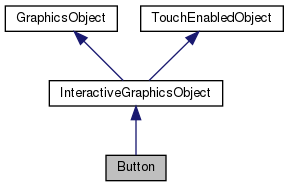
Inheritance diagram for Button:
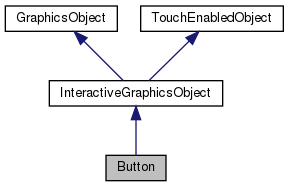
Collaboration diagram for Button:
Public Member Functions | |
| Button () | |
| ~Button () | |
| void | setText (const std::string &text) |
| Sets the button text. More... | |
| void | setGeometry (Rect r) |
| Sets the button geometry (position and size) More... | |
| void | setFillColor (const Color fillColor) |
| Set the fill color. More... | |
| void | setTextColor (const Color textColor) |
| Sete the text color. More... | |
| void | setFontPath (const std::string &fontPath) |
| Set the button text font. More... | |
| void | setFontSize (int fontSize) |
| Set the button font size. More... | |
| void | draw (uint32_t time) override |
| The draw method. It will be called once per frame for each object in a scene. More... | |
| int | getX () const override |
| int | getY () const override |
| int | getWidth () const override |
| int | getHeight () const override |
 Public Member Functions inherited from InteractiveGraphicsObject Public Member Functions inherited from InteractiveGraphicsObject | |
| virtual | ~InteractiveGraphicsObject ()=default |
| Public Member Functions inherited from GraphicsObject | |
| virtual | ~GraphicsObject ()=default |
| bool | isVisible () const |
| void | setVisibility (bool visible) |
| Public Member Functions inherited from TouchEnabledObject | |
| TouchCallback | getTouchCallback () const |
| void | setTouchCallback (TouchCallback cb) |
| Set the touch interaction callback. More... | |
| bool | isTouchEnabled () const |
| True if the object reacts to touch events. More... | |
| void | setTouchEnabled (bool enabled) |
| Set if the object has to react to touch events. More... | |
| bool | isPropagateInteraction () const |
| True if the object will call the handlers of object placed below when touched. More... | |
| void | setPropagateInteraction (bool propagate) |
| Set wheter the object has to call the handlers of objects placed below, when touched. More... | |
Detailed Description
A simple text button.
Constructor & Destructor Documentation
◆ Button()
| Button::Button | ( | ) |
◆ ~Button()
| Button::~Button | ( | ) |
Member Function Documentation
◆ draw()
|
overridevirtual |
The draw method. It will be called once per frame for each object in a scene.
- Parameters
-
time A time parameter (as given by SDL_GetTicks) for time-based animation purposes
Implements GraphicsObject.
◆ getHeight()
|
overridevirtual |
Implements TouchEnabledObject.
◆ getWidth()
|
overridevirtual |
Implements TouchEnabledObject.
◆ getX()
|
overridevirtual |
Implements TouchEnabledObject.
◆ getY()
|
overridevirtual |
Implements TouchEnabledObject.
◆ setFillColor()
| void Button::setFillColor | ( | const Color | fillColor | ) |
Set the fill color.
- Parameters
-
fillColor The fill color
◆ setFontPath()
| void Button::setFontPath | ( | const std::string & | fontPath | ) |
Set the button text font.
- Parameters
-
fontPath The path to the font
◆ setFontSize()
| void Button::setFontSize | ( | int | fontSize | ) |
Set the button font size.
- Parameters
-
fontSize The font size
◆ setGeometry()
| void Button::setGeometry | ( | Rect | r | ) |
Sets the button geometry (position and size)
- Parameters
-
r The button geometry
◆ setText()
| void Button::setText | ( | const std::string & | text | ) |
Sets the button text.
- Parameters
-
text The button text
◆ setTextColor()
| void Button::setTextColor | ( | const Color | textColor | ) |
Sete the text color.
- Parameters
-
textColor The text color
The documentation for this class was generated from the following files:
- include/TouchCP/Button.h
- src/Button.cpp